 Skip to main content
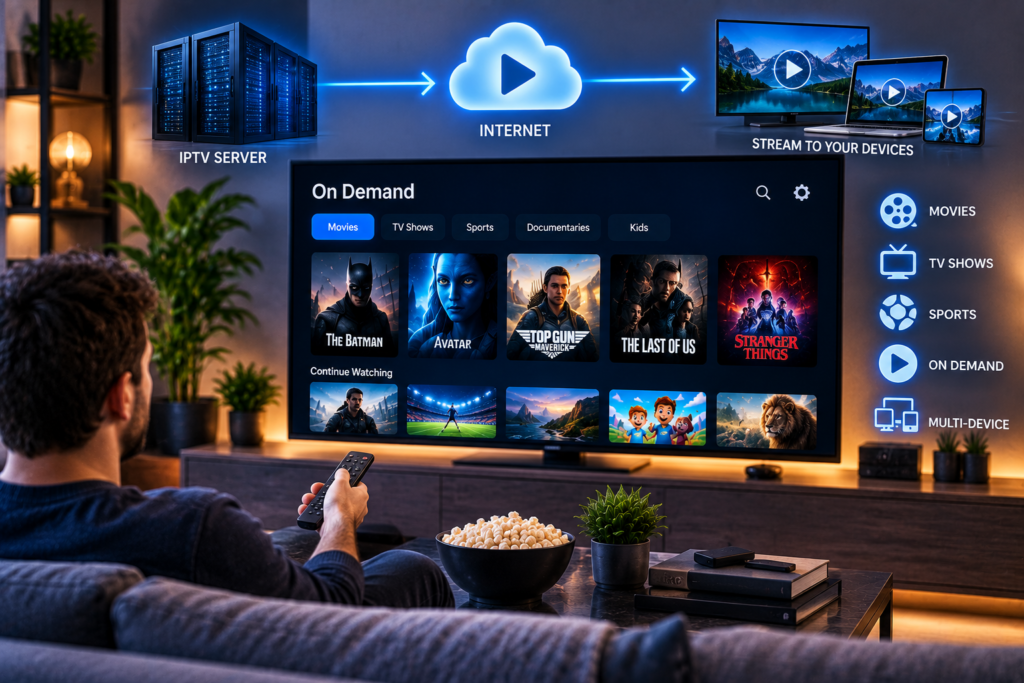
Instead of waiting for a television channel to broadcast a film at a certain time, the viewer selects the title from a library. The server then delivers that specific video to the viewer’s Smart TV, phone, tablet, computer, or streaming device.
A typical IPTV on demand library may contain films, television series, documentaries, children’s programmes, international entertainment, and other recorded content.
The exact library depends on the IPTV provider and its content rights.
IPTV On Demand: How It Works in Simple Terms
The easiest way to understand IPTV on demand is to follow what happens after you press play.
- You open an IPTV application on your device.
- The app displays the VOD library supplied by your IPTV service.
- You select a movie or episode.
- The application sends a request to the IPTV server.
- The server identifies the selected video file.
- The stream begins travelling through the internet to your device.
- The app temporarily stores a small amount of video in a buffer.
- Your device decodes the video and audio and displays it on screen.
Unlike a live television channel, the video starts because you requested it. You can usually pause, resume, fast forward, or restart the content depending on the app and service.
Where Is IPTV On Demand Content Stored?
On demand content is normally stored on servers rather than being broadcast continuously.
These servers hold video files and information about each title. When a viewer selects something, the system retrieves the relevant file and begins delivering it.
Larger services may use several servers or content delivery infrastructure to reduce the distance between the viewer and the source of the video.
This matters because server location, capacity, network congestion, and available bandwidth can all influence how quickly a video begins and whether playback remains stable.
The app on your television is therefore only one part of the system. Good playback also depends heavily on the infrastructure behind the service.
How the IPTV App Finds Movies and Series
An IPTV app does not normally search the provider’s servers manually every time you open it.
Instead, the service sends information about available content to the player. This may include the title, category, poster image, release year, episode number, description, language, and stream address.
The app organizes this information into menus such as Movies, Series, Recently Added, Action, Drama, Kids, or Swedish Content.
This metadata is why a well-configured VOD library feels more like a modern streaming service than a folder full of video files.
If you are setting up IPTV for the first time, the IPTV installation instructions explain the general process of connecting compatible devices and applications to a subscription.
How Is IPTV On Demand Different From Live IPTV?
Live IPTV and VOD both use internet delivery, but the viewing experience is different.
Live IPTV
A live channel is already broadcasting. When you open it, you join the stream at whatever point the programme has reached.
You normally cannot choose when the programme begins unless the service also supports catch up television or recording.
IPTV On Demand
A VOD title remains stored until you request it.
You control when playback begins. In many apps, you can also pause the video, continue later, jump forward, or restart from the beginning.
This makes on-demand IPTV particularly useful for films and television series because viewers are not tied to a broadcast schedule.
VOD Is Different From Catch Up TV
VOD and catch up television are sometimes confused, but they are not exactly the same.
VOD is a prepared library of stored movies, series, and other titles. Catch-up television usually stores recently broadcast programmes from live channels for a limited period.
For example, if a programme was shown on a Swedish television channel yesterday, catch up may allow you to replay that broadcast. A film inside the VOD section may remain available independently of the television schedule.
Whether either feature is available depends on the provider.

What Role Does Buffering Play?
Buffering is part of normal internet video playback.
Your IPTV app usually downloads a small amount of the video before displaying it. It then continues receiving more data while you watch.
This temporary reserve helps protect playback from small variations in internet speed.
If data arrives faster than the video consumes it, playback remains smooth. If the connection or server cannot deliver enough data, the buffer becomes empty, and the video may stop while the app waits for more information.
This is what viewers commonly describe as buffering.
Why Does IPTV On Demand Buffer?
Buffering can have several causes.
Your home internet connection may be slow or unstable. Wi Fi interference can reduce available bandwidth. Other people in the household may be downloading large files or streaming video at the same time.
The IPTV server can also become overloaded.
Device performance matters as well. An older Smart TV or streaming box may struggle with higher video resolutions or newer codecs even when the internet connection is fast enough.
If one movie buffers but other VOD titles play normally, the problem may relate to that specific stream. If everything buffers, check your connection, device, app, and provider.
Does Higher Resolution Need More Internet Speed?
Generally, yes.
A higher resolution video contains more visual information and usually requires a higher bitrate than a lower resolution version.
Standard definition uses less bandwidth than HD. Full HD normally requires more, while 4K can require significantly more depending on compression and bitrate.
However, resolution alone does not determine bandwidth use.
Two 4K streams can have very different bitrates depending on how the video was encoded. Efficient compression can deliver good picture quality while using less data.
For this reason, stable internet performance is more useful than focusing only on the maximum speed advertised by your broadband provider.
How Does Video Quality Adjust During Playback?
Some streaming systems use adaptive bitrate technology.
Instead of providing only one version of a video, the server may hold several versions encoded at different quality levels.
The player monitors network conditions and can switch between those versions.
If the connection becomes weaker, the player may temporarily reduce picture quality to keep the stream running. When more bandwidth becomes available, it can move back to a higher quality stream.
Not every IPTV system handles quality in exactly the same way, so the experience depends on both the provider and the player.
How Are Movies and Series Organized?
A useful IPTV VOD library should make content easy to find.
Movies may be grouped by genre, language, country, popularity, release year, or recently added titles. Series are normally divided into seasons and episodes.
Search functionality becomes especially important when the library is large.
For Swedish households that also use IPTV for live television, reviewing the available IPTV channel selection can help clarify the difference between live channels and stored entertainment available through the wider service.
Good organization matters almost as much as library size. Thousands of titles are difficult to use if categories, search results, and episode information are poorly arranged.
Which Devices Support IPTV On Demand?
Most modern internet-connected devices can support IPTV VOD when a compatible player is available.
Common options include Samsung and LG Smart TVs, Android TV devices, Fire TV hardware, Apple TV, smartphones, tablets, Windows computers, and Mac computers.
The experience can vary considerably between apps.
Some players provide polished movie posters, descriptions, watch history, subtitles, and episode navigation. Others focus primarily on live television and provide only a basic VOD menu.
This is why choosing the right IPTV app can affect the experience even when the underlying subscription is the same.
How Do M3U and Xtream Codes Affect VOD?
IPTV providers can deliver account information in different formats.
An M3U playlist is often associated with lists of streams. It can contain live channels and, depending on how it is created, VOD links.
Xtream Codes style login systems generally give compatible apps a more structured way to retrieve live TV, films, series, categories, and programme information.
This can make VOD libraries easier to navigate because the player can display separate sections for movies and series rather than treating every stream as another item in one long playlist.
Does On Demand Content Use the Same Internet as Live TV?
Yes. Both are delivered through your internet connection.
The difference lies mainly in how the content is stored and requested.
Live IPTV sends an ongoing broadcast stream. VOD retrieves a stored video after the viewer selects it.
Because a stored video is not tied to a live schedule, the player may have more flexibility to buffer data ahead of playback. That can sometimes make on demand video more forgiving of small network fluctuations than a live sports stream.
What Should You Check in an IPTV VOD Service?
Do not judge a service only by the number of movies advertised.
Open several titles and check how quickly they begin. Test films, series, older content, and recently added programmes. Make sure episodes are correctly ordered and that subtitles work where expected.
Check picture quality on the television you normally use.
Also test navigation. A large VOD library should have useful categories and a search function rather than forcing you to scroll through thousands of titles.
When comparing another provider such as Nordic IPTV King, use the same device and internet connection where possible. This makes it easier to compare loading time, library organization, picture quality, and playback stability fairly.
Is IPTV On Demand the Same as Netflix?
The viewing concept is similar because both allow users to select stored content and begin playback whenever they want.
The underlying business model and platform can be different.
Major subscription streaming platforms control their own applications, catalogues, rights agreements, recommendation systems, and delivery infrastructure. An IPTV service may combine live television, EPG information, catch up features, and VOD content inside one player.
The important similarity is viewer control. You select a stored title instead of waiting for a scheduled broadcast.
Frequently Asked Questions
What Does VOD Mean in IPTV?
VOD means Video on Demand. It refers to stored movies, series, and other programmes that users can select and play whenever they want.
Does IPTV On Demand Need Internet?
Yes. The video travels from the IPTV server to your device through an internet connection.
Can You Pause IPTV On Demand?
Usually, yes. Most compatible VOD players allow basic controls such as pause, resume, seek, and restart, although features can vary between applications.
Why Does VOD Work but Live IPTV Buffers?
Live television has to arrive continuously in real time. VOD can often buffer more data in advance, which may help it handle temporary changes in network speed more smoothly.
Does IPTV On Demand Work on Smart TVs?
Yes, when the Smart TV supports a compatible IPTV application and the provider supplies a suitable VOD service.
Can IPTV On Demand Include 4K Movies?
Yes, a VOD library can contain 4K streams. Playback quality still depends on the source file, provider infrastructure, app, device, television, and internet connection.
IPTV on demand works by storing video on servers and delivering the selected title through the internet when a viewer requests it. The quality of the experience depends on far more than the size of the VOD library, including server performance, video encoding, app design, device compatibility, and network stability. If you want to explore live television, movies, series, HD, FHD, and 4K streaming options designed for Swedish viewers, visit Monster IPTV and review the available service for your preferred devices.
