 Skip to main content
GSE Smart IPTV Pro Complete Guide and Review
GSE Smart IPTV Pro Complete Guide and Review
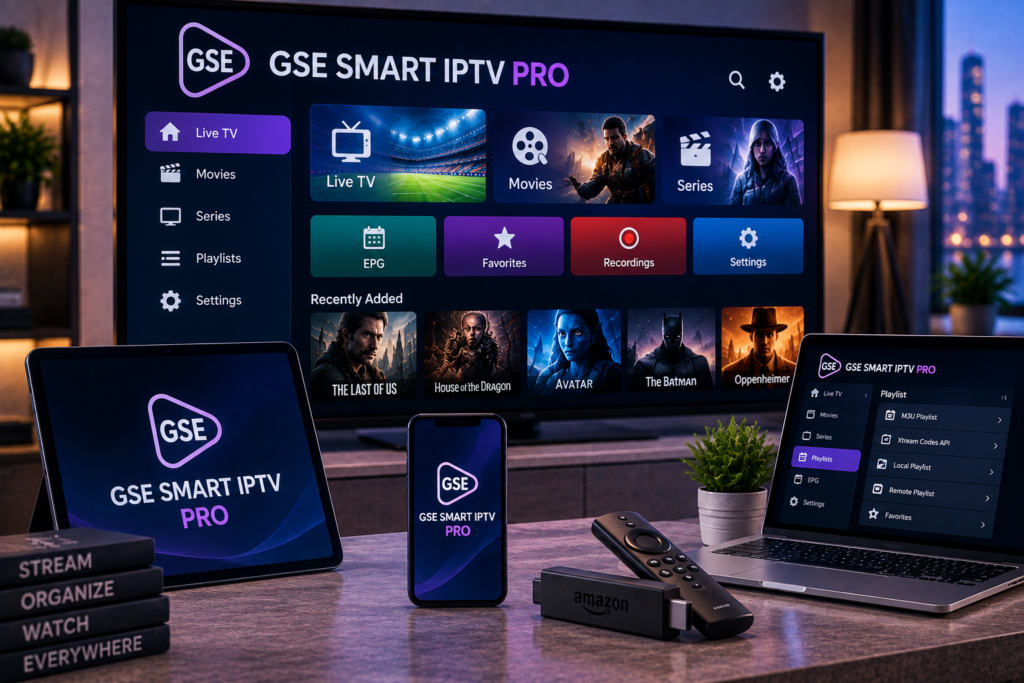
GSE Smart IPTV Pro is an IPTV player designed to organize and play live television, video on demand, playlists, and EPG data supplied by an IPTV provider or another compatible source.
It is important to understand one thing from the beginning: GSE Smart IPTV Pro is a player, not an IPTV subscription. The application does not provide premium television channels, sports packages, movies, or series by itself. Users need to add their own compatible content or IPTV service credentials. The official Google Play and Apple listings both make this distinction clear.
For IPTV users in Sweden, the app offers several useful features, including M3U playlists, Xtream Codes API support, EPG integration, subtitles, Chromecast, AirPlay on supported Apple devices, parental controls, and a built-in media player.
This guide explains how GSE Smart IPTV Pro works, how to set it up, its strongest features, possible drawbacks, and whether it remains a practical IPTV player in 2026.
What Is GSE Smart IPTV Pro?
GSE Smart IPTV Pro is a media player created by GSE Technology. It is designed to receive IPTV playlists and credentials supplied by the user and organize that content inside one interface.
The application can handle live television and non live streams. It supports several common IPTV formats, including M3U playlists and Xtream Codes API connections.
On Android, the official listing also highlights XMLTV EPG support, automatic live stream reconnection, parental controls, subtitles, several languages, different themes, and a built in media player.
The Apple version adds features such as playlist management through a web interface, AirPlay support, live television recording, favourites, local and remote playlists, and EPG timeline functionality.
Does GSE Smart IPTV Pro Include IPTV Channels?
No.
This is one of the most important points for beginners.
Downloading the application does not automatically give you Swedish channels, sports, films, international television, or premium entertainment.
GSE Smart IPTV Pro acts as the player. Your IPTV provider supplies the content access, playlist, server details, or login credentials.
Think of the application as a television screen and the IPTV subscription as the signal being delivered to it.
If you already have an IPTV service, you can review the Available IPTV channels before configuring the player so you know which categories and programmes should appear once the account has been added.
Main Features of GSE Smart IPTV Pro
M3U Playlist Support
M3U remains one of the most common methods of loading IPTV content.
GSE Smart IPTV Pro supports both local and remote M3U playlists. A remote playlist normally uses a web address supplied by your IPTV provider, while a local playlist is stored directly on your device.
The app can also display playlist contents, making it easier to see how channels and groups are organized.
Xtream Codes API Support
GSE Smart IPTV Pro also supports Xtream Codes-style API connections.
Instead of entering a long M3U address, users normally enter a server address, username, and password supplied by their service provider.
This method can automatically organize live channels, video on demand, programme information, and other categories when supported by the provider.
Electronic Program Guide
An Electronic Program Guide, commonly called an EPG, shows information about current and upcoming television programmes.
GSE Smart IPTV Pro supports XMLTV-based guide data, including remote and local EPG sources. The Android listing states that XML, ZIP, and GZ formats can be used.
A good EPG makes IPTV significantly easier to navigate because users can see what is playing without switching through every channel.
Built-in Media Player
The app includes its own media player, so users do not normally need to install a separate video player.
The Android listing describes support for a broad range of video formats and streaming protocols, including HTTP, M3U8, RTSP, and RTMP.
This flexibility is useful when an IPTV service contains streams encoded in different formats.
Subtitle Support
Subtitles are particularly useful for Swedish viewers who watch international movies, series, documentaries, and television channels.
The application supports embedded subtitles as well as external SRT subtitle files. The Android version lists support for several additional subtitle formats.
Subtitle availability still depends on the original stream or content source.
Chromecast and AirPlay
Chromecast support is advertised on both the Android and Apple listings. The Apple version also advertises AirPlay with full screen external display support.
However, this is an area where actual results may vary. Some current store reviews report Chromecast problems, while other users report positive long term experiences with the app.
If casting is essential to your setup, test it on your own television and network before relying on it as your main viewing method.
How to Set Up GSE Smart IPTV Pro
The exact process depends on whether your provider gives you an M3U URL or Xtream Codes credentials.
Step 1: Install the Application
Download GSE Smart IPTV Pro from the official app marketplace available on your device.
Avoid unofficial copies from unknown download websites. Using the official store version reduces the risk of installing modified software.
Step 2: Get Your IPTV Details
Your IPTV provider should supply the credentials required to connect.
These may include an M3U playlist URL or a server address, username, and password.
Keep these details private because they may provide direct access to your subscription.
Step 3: Add the Playlist
Open the playlist section inside GSE Smart IPTV Pro and choose the connection method that matches the information supplied by your provider.
Enter the details carefully. A missing character in a server address or password can prevent the playlist from loading.
If you are new to IPTV configuration, the IPTV installation instructions can help you understand the general setup process before entering your subscription details.
Step 4: Allow the Playlist to Load
Large channel lists may take some time to import.
After the playlist loads, you should see categories such as live television, sports, movies, entertainment, news, and other groups depending on your IPTV subscription.
Step 5: Configure the EPG
If programme information does not load automatically, your provider may supply a separate XMLTV EPG address.
Add the address through the EPG settings and allow the programme data to update.
How Does GSE Smart IPTV Pro Perform?
Performance depends on several factors.
The app itself handles playback and playlist organization, but the quality of your viewing experience also depends on your IPTV provider, internet connection, Wi Fi network, streaming device, and original video source.
A player cannot repair an unstable server.
If a channel buffers repeatedly in GSE Smart IPTV Pro, test another channel and, where possible, another application. This helps determine whether the problem is caused by the player or the IPTV stream.
For HD and FHD viewing, a stable broadband connection is more important than simply having a high advertised maximum speed. 4K streams require even more consistent bandwidth.
GSE Smart IPTV Pro on Android
The current Google Play version supports phones, tablets, televisions, and Chromebooks according to the store listing.
Google Play also lists compatibility with ARM- and Intel-based devices, Swedish among 31 supported languages, automatic stream reconnection, parental controls, multiple themes, and EPG support.
The application was updated in August 2026 with a note mentioning fixes for some Android TV issues.
For Swedish Android TV users, the combination of television support, Swedish language availability, and multiple playlist methods makes the app flexible enough for many home setups.
GSE Smart IPTV Pro on iPhone and iPad
The Swedish App Store version supports iPhone and iPad and requires iOS or iPadOS 9.0 or later according to the current listing. Swedish is also included among the supported interface languages.
The Apple version includes several useful management tools that go beyond basic playback.
Users can manage playlists, create favourites, import remote playlists, work with EPG data, use AirPlay, and manage playlists through a web interface.
This can make the app useful for people who want more control over larger IPTV libraries.
GSE Smart IPTV Pro Pros and Cons
Main Advantages
The biggest strength of GSE Smart IPTV Pro is flexibility.
It supports several common IPTV connection methods, has its own player, works with EPG information, supports subtitles, provides parental controls, and includes playlist management features.
Swedish language support is another useful feature for viewers who prefer navigating applications in Swedish.
The app also separates the media player from the IPTV provider, which means users can change compatible services without necessarily changing their preferred player.
Possible Drawbacks
The interface includes many options, which can make the first setup feel complicated for someone who has never used an IPTV player.
Some store reviews also report issues with casting and reliability. Other reviewers describe years of satisfactory use, so the current feedback is mixed rather than uniformly positive or negative.
The most sensible approach is therefore to test the application with your own device, connection, and IPTV service rather than judging it only from store reviews.
GSE Smart IPTV Pro Compared With Other IPTV Players
There is no single IPTV player that suits every user.
Some viewers prefer a very simple interface, while others want detailed playlist management, multiple connection types, EPG customization, subtitles, casting, and external display support.
When comparing an IPTV service from another provider such as Viking IPTV, use the same player, device, and internet connection where possible. This makes it easier to separate player performance from differences in the underlying IPTV service.
For television-first households, remote control navigation may matter most. Mobile users may care more about subtitles, AirPlay, casting, and playlist management.
Is GSE Smart IPTV Pro Legal?
The application itself is a media player and does not supply premium IPTV content.
Its official listings state that users must provide their own content and that the developer does not endorse streaming copyrighted material without the copyright holder’s permission.
The legal question therefore depends primarily on the source of the content being loaded into the application.
Using an IPTV player with properly authorized content is different from using it to access material distributed without permission.
Frequently Asked Questions
Is GSE Smart IPTV Pro an IPTV Provider?
No. It is an IPTV player. You need a separate compatible IPTV service or your own media source.
Does GSE Smart IPTV Pro Support M3U?
Yes. The official listings describe support for local and remote M3U playlists.
Does GSE Smart IPTV Pro Support Xtream Codes?
Yes. Xtream Codes API support is listed for the application, allowing compatible services to load live and video content through account credentials.
Can I Use GSE Smart IPTV Pro in Sweden?
Yes, provided the app is available for your device. Swedish is included among the supported interface languages, and the application is currently listed in the Swedish Apple App Store.
Does GSE Smart IPTV Pro Work With Chromecast?
Chromecast support is advertised by the developer, although some user reviews report casting problems. Testing Chromecast on your specific device and network is advisable.
Does the App Include Free TV Channels?
No. The developer states that the application does not provide media content apart from sample material. Users need to supply their own compatible content or subscription.
GSE Smart IPTV Pro remains a feature-rich option for users who want M3U playlists, Xtream Codes support, EPG data, subtitles, playlist management, and flexible playback across compatible devices. Its extensive settings may require a little learning, but they also provide more control than many basic IPTV players. If you want to pair an IPTV player with live TV, sports, movies, series, HD, FHD, and 4K viewing options for Sweden, visit Monster IPTV to explore the available services and choose a setup that fits your devices.
