 Skip to main content
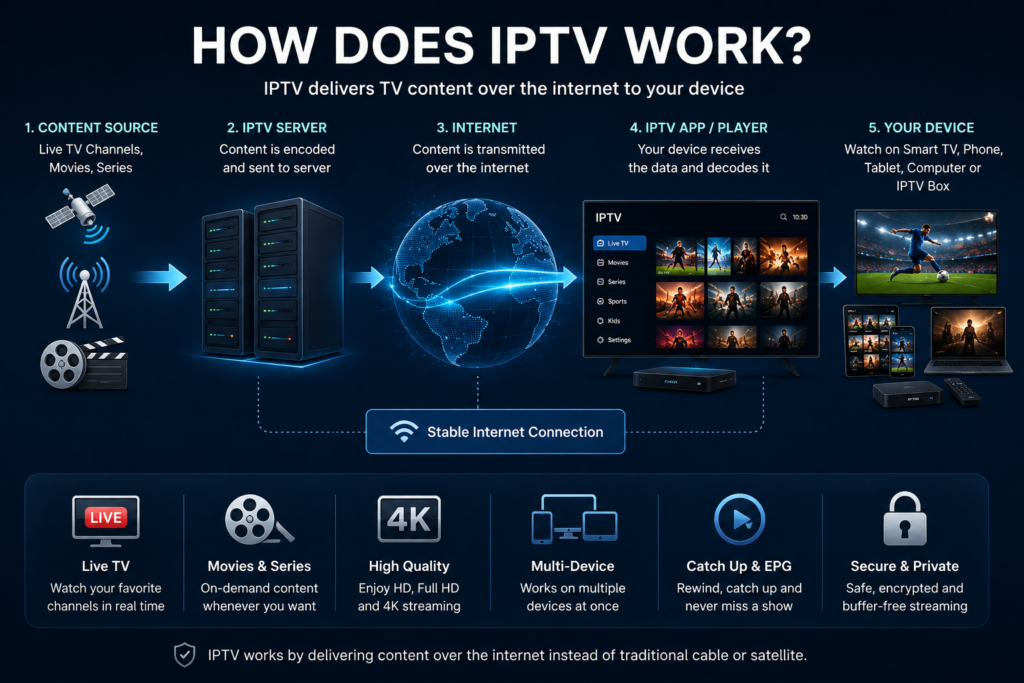
If you have ever wondered how does iptv work, the simplest answer is that IPTV delivers television through an internet connection rather than relying on a traditional cable line, terrestrial antenna, or satellite dish.
The television programme is converted into digital data, sent through internet based networks, received by your IPTV player or device, and then displayed on your screen. The process happens quickly enough that live television can feel similar to ordinary broadcast TV.
For viewers in Sweden, IPTV can provide access across Smart TVs, computers, smartphones, tablets, Android devices, and compatible streaming boxes. Understanding what happens between the television source and your screen also makes it easier to understand buffering, picture quality, apps, playlists, and internet requirements.
What Does IPTV Mean?
IPTV stands for Internet Protocol Television.
Internet Protocol is the system used to move data between devices across networks. Instead of delivering a television signal through a dedicated cable or satellite transmission, IPTV sends television as digital data using IP technology.
Think about opening a website. Your device requests information from a server, the server sends the requested data, and your browser displays it.
IPTV follows a similar basic idea, except the information being delivered is video and audio.
The service may include live television, sports, movies, series, catch up programming, and video on demand.
How Does IPTV Work Step by Step?
The complete technology can become quite technical, but the viewer experience can be understood in five simple stages.
1. Television Content Enters the IPTV System
The process begins with the original content.
This might be a live television channel, sports broadcast, movie, television series, or another video source. The provider receives the source and prepares it for digital distribution.
Raw video is usually too large to send efficiently to thousands of viewers, so it needs further processing.
2. Video Is Encoded and Compressed
The video is converted into a digital streaming format.
Encoding and compression reduce the amount of data required while trying to preserve picture and sound quality. Different versions of a stream may also be prepared for different resolutions and network conditions.
For example, a provider may prepare HD, FHD, and 4K versions where suitable.
This is one reason streaming quality can differ between channels. The quality of the original source and the way it has been encoded both influence what eventually appears on your television.
3. IPTV Servers Prepare the Stream
After processing, the content is handled by IPTV servers.
Servers can organize live channels, movie libraries, series, account information, programme guides, and access permissions.
When you select something to watch, your device requests the relevant stream.
For live television, the server delivers the current broadcast. For video on demand, it retrieves the movie or episode you selected.
4. The Stream Travels Over an IP Network
The video then travels toward your home through internet based infrastructure.
Instead of receiving an entire programme before playback begins, IPTV normally sends the content continuously in smaller pieces of data. Your player receives enough information to begin showing the programme while more data continues arriving.
This is what allows live television and long movies to begin playing without downloading the complete video first.
5. Your IPTV App Decodes the Video
Finally, your Smart TV, IPTV box, computer, phone, or tablet receives the stream.
The IPTV application decodes the incoming video and audio and displays them on your screen.
The player may also show channel categories, favourites, subtitles, programme information, movies, series, and other features supplied by the service.
Anyone setting up IPTV for the first time can use these IPTV installation instructions to understand how different devices and applications are configured.

Live IPTV and Video on Demand Work Differently
IPTV is commonly associated with live channels, but the technology can deliver several forms of television.
Live Television
Live IPTV delivers a programme while it is being broadcast.
News and sports are obvious examples. When you select a live channel, your device requests the active stream and begins displaying it.
Because live viewing cannot simply wait for the complete programme to download, network stability and server performance become particularly important.
Video on Demand
Video on demand lets you choose a stored movie or television episode and start it when you want.
The server already has the video available, so it sends the selected content directly to your device.
Catch Up and Time Shifted Television
Some systems also provide previously broadcast programmes for a limited period.
This gives viewers more control than traditional scheduled television because a programme does not necessarily have to be watched at the exact time it originally aired.
What Is the Difference Between IPTV and Cable TV?
Traditional cable television distributes television signals through a cable network connected to the home.
IPTV uses IP based delivery.
From the viewer’s perspective, both can present a familiar channel guide and live programmes. The important difference is how the content reaches the screen.
IPTV can also make multi device viewing easier because an internet connected television, mobile device, or computer can run compatible software without requiring the same type of dedicated television connection in every room.
What Is the Difference Between IPTV and Satellite TV?
Satellite television receives broadcasts from satellites through a dish installed at the property.
IPTV receives its content through an internet connection.
Satellite reception can be influenced by dish alignment and severe weather conditions. IPTV does not need a satellite dish, but its performance depends heavily on the quality of the internet connection and streaming infrastructure.
Both systems therefore have different technical dependencies.
Is IPTV the Same as Streaming?
They are closely related, but the terms are not always used in exactly the same way.
Both deliver video using internet technology.
IPTV is commonly associated with television style services that include live channels, programme guides, subscriptions, catch up features, and video libraries. Streaming is the broader term and includes services focused mainly on individual movies, programmes, videos, or other internet media.
From a user’s point of view, the technologies can feel very similar because both involve selecting content in an application and receiving it over the internet.
What Is an IPTV Player?
An IPTV player is the application that displays the service on your device.
The player and subscription are not necessarily the same thing.
A player may support account details supplied by a provider, M3U playlists, or Xtream Codes style login information. Once connected, the application organizes the available content into a usable interface.
Common features can include live TV categories, movies, series, favourites, search, parental controls, subtitles, and an electronic programme guide.
What Is an EPG?
EPG stands for Electronic Programme Guide.
It is the digital version of a traditional television schedule. The guide can show what is currently playing and what will be shown later.
An EPG makes IPTV easier to navigate because you do not have to open every live channel just to see what is being broadcast.
Programme guide accuracy depends on the data supplied to the application.
Why Does IPTV Sometimes Buffer?
Buffering happens when the player cannot receive or process video data quickly enough to maintain smooth playback.
There is no single cause.
Weak WiFi can be responsible. Other devices may be using large amounts of bandwidth. The router may be overloaded. The IPTV server may be busy. The selected stream may require more bandwidth than the connection can consistently provide.
Your device also matters.
An older Smart TV may struggle with a stream that plays smoothly on a newer computer or streaming box.
A useful troubleshooting method is to change one factor at a time. Try another channel, another device, or an Ethernet connection. This helps determine whether the problem comes from the stream, the network, or the player.
How Does IPTV Deliver HD, FHD, and 4K?
Higher resolutions contain more picture information and therefore usually require more data.
HD uses less bandwidth than FHD, while genuine 4K streaming normally places greater demands on the connection, device, and decoding hardware.
The resolution label is only one part of picture quality.
Compression, bitrate, frame rate, original source quality, and connection stability also matter. A stable FHD broadcast can look better in everyday viewing than an unstable 4K stream that repeatedly pauses.
When comparing content options, Swedish viewers can check the available IPTV channel selection and consider which categories and picture qualities matter most to their household.
Which Devices Can Use IPTV?
One of IPTV’s practical advantages is flexibility.
Compatible services can work across Smart TVs, Android TV devices, phones, tablets, laptops, desktop PCs, and dedicated streaming equipment.
The exact installation method depends on the operating system and application.
A Smart TV may use an IPTV app installed directly from its application store. A Windows user may install desktop software. A phone or tablet may use a mobile IPTV player.
When comparing the wider IPTV market, users may also come across providers such as JA IPTV. Device compatibility, service terms, available content, and support should be checked individually rather than assuming every provider works the same way.
Does IPTV Need Fast Internet?
IPTV needs a connection capable of delivering the selected stream consistently.
Speed matters, but stability matters just as much.
A fast connection that repeatedly drops can produce a worse viewing experience than a slightly slower but stable connection.
Household usage should also be considered. If several people are gaming, downloading files, making video calls, or streaming at the same time, all of those activities share available network capacity.
Ethernet is often useful for a television or streaming device that stays in one location. Good WiFi can also work well when signal strength and router placement are suitable.
Is IPTV Legal?
IPTV is a technology, and the technology itself is used by legitimate broadcasters, telecom companies, streaming platforms, and television services.
The legal question concerns the content being distributed and whether the service has permission to provide it.
Users should therefore distinguish between IPTV technology and the rights associated with a particular service or stream. A large channel list or an IPTV application does not by itself establish whether content distribution is authorized.
Checking provider terms, content information, and applicable rules is a sensible part of choosing any television service.
Frequently Asked Questions
How does IPTV reach my television?
The provider processes television content, sends it through IP based networks, and your compatible device or IPTV application receives and decodes the stream for playback.
Does IPTV work without internet?
Normally, no. IPTV depends on network connectivity because the television content is delivered using Internet Protocol.
Do I need a Smart TV for IPTV?
No. Compatible IPTV services can also work on computers, smartphones, tablets, streaming devices, and IPTV boxes.
What causes IPTV buffering?
Common causes include weak WiFi, insufficient network capacity, overloaded routers, demanding video quality, device limitations, or problems with the source stream.
Is 4K IPTV better than FHD?
4K can provide greater detail when the original content, provider, connection, device, and display all support it. Stable playback remains more important than resolution alone.
Does an IPTV app include television channels?
Not necessarily. Many IPTV applications are simply media players. Content access normally comes from a separate television or IPTV service.
Understanding how IPTV works makes choosing and troubleshooting a service much easier. Instead of seeing it as complicated television technology, think of it as a chain connecting content, servers, the internet, your IPTV application, and your screen. If you want to use that technology for live TV, sports, movies, series, HD, FHD, and 4K viewing across compatible devices in Sweden, you can explore the available options at Monster IPTV.
